An Ansible Windows Jump Host is essential in locked-down environments where direct access to Windows servers is restricted. In such cases, Ansible connects to target Windows nodes only through a trusted jump host. Therefore, this setup improves security while still enabling automation at scale.
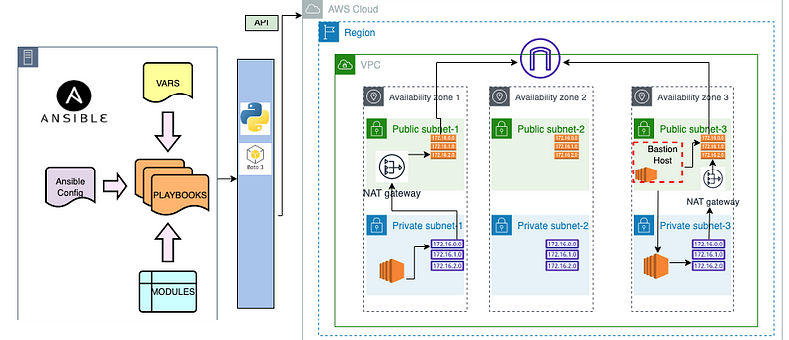
Ansible manages Windows systems using WinRM. However, because of strict network controls, WinRM traffic often must pass through a bastion host. To solve this, you can configure Nginx on a Windows jump host to proxy WinRM traffic securely to multiple Windows target servers.
What Is WinRM and Why It Matters for Ansible Windows Jump Host
WinRM is a native Windows management protocol that allows remote communication over HTTP or HTTPS. Moreover, it is enabled by default on modern Windows Server versions. However, additional configuration is usually required for Ansible integration.
Because WinRM traffic is standard web traffic, it can be proxied easily. As a result, Nginx becomes a practical choice for routing WinRM requests through an Ansible Windows Jump Host.
For deeper protocol details, Microsoft provides authoritative documentation on WinRM architecture and security at:
https://learn.microsoft.com/windows/win32/winrm/portal
Why Use an Ansible Windows Jump Host in Restricted Networks
In highly secured environments, only a single host may access internal systems. This host is commonly called a jump host or bastion host. Consequently, Ansible must communicate through this system instead of connecting directly.
Using an Ansible Windows Jump Host provides several benefits:
- Reduced attack surface
- Centralized access control
- Easier auditing and compliance
- Controlled WinRM exposure
At the same time, this pattern aligns well with modern DevSecOps and Zero Trust models.
Prerequisites for Ansible Windows Jump Host Setup
Before starting, ensure the following components are ready:
- Ansible Controller with Ansible 2.9
- Windows Server for Jump Host
- Windows Server 2012 R2 or later as Target Node
- Nginx for Windows
- OpenSSL for certificate generation
- pywinrm installed on Ansible Controller
Because of these dependencies, planning the environment upfront saves time later.
Installing Nginx on the Windows Jump Host
To begin, install Nginx on the Windows jump host. This service will proxy WinRM traffic to the backend Windows servers.
Steps to follow:
- Download the stable Nginx build from https://nginx.org/en/download.html
- Extract it to
C:\Program Files\nginx - Start Nginx from PowerShell
- Confirm the welcome page loads on
http://localhost
Once verified, Nginx is ready for SSL and proxy configuration.
OpenSSL Configuration for Ansible Windows Jump Host
Secure communication is critical. Therefore, you must generate SSL certificates for Nginx.
- Download OpenSSL binaries from
https://wiki.openssl.org/index.php/Binaries - Install Visual Studio 2017 if prompted
- Install OpenSSL using the MSI package
Next, generate the certificate:
openssl req -x509 -nodes -days 365 -newkey rsa:2048 -keyout privatekey.key -out certificate.crt
During generation, provide the jump host IP as the Common Name. Afterward, create C:\SSL and move both files there.
Nginx Proxy Configuration for Ansible Windows Jump Host
Now configure Nginx to forward WinRM traffic securely.
Example configuration:
server {
    listen 8080 ssl;
    server_name 192.168.0.23;

    ssl_certificate     C:\SSL\certificate.crt;
    ssl_certificate_key C:\SSL\privatekey.key;

    location /192.168.0.48 {
        proxy_pass http://192.168.0.48:5985/wsman;
        proxy_set_header Host $host;
        proxy_set_header X-Real-IP $remote_addr;
        proxy_set_header X-Forwarded-For $proxy_add_x_forwarded_for;
        proxy_connect_timeout 90;
        proxy_read_timeout 90;
    }
}
Here, the jump host listens on port 8080. Meanwhile, each target server maps to a unique path. As a result, multiple Windows nodes can share one Ansible Windows Jump Host.
Restart Nginx after saving the configuration.
Ansible Inventory Configuration Behind the Jump Host
With the proxy ready, configure the Ansible inventory.
Example entry:
192.168.0.48 ansible_host=192.168.0.23 ansible_user=demo ansible_password=2!ppy0ps ansible_port=8080 ansible_connection=winrm ansible_winrm_path=/192.168.0.48 ansible_winrm_server_cert_validation=ignore
In this setup:
ansible_hostpoints to the jump hostansible_winrm_pathmaps to the target node- WinRM traffic flows securely through Nginx
Because of this abstraction, Ansible playbooks remain clean and reusable.
WinRM Setup on Target Windows Servers
Ansible requires PowerShell 3.0 and .NET Framework 4.0 or higher. Therefore, older systems must be upgraded.
After upgrading PowerShell, configure WinRM using:
.\ConfigureRemotingForAnsible.ps1
This script enables HTTP and HTTPS listeners and configures authentication. Consequently, Ansible can communicate reliably with the Windows nodes.
Testing Ansible Windows Jump Host Connectivity
Finally, verify connectivity from the Ansible controller:
ansible all -i windows -m win_ping
If successful, the Ansible Windows Jump Host is working as expected.
How ZippyOPS Enhances Ansible Windows Jump Host Deployments
While this setup can be built manually, enterprise environments often require more than basic configuration. ZippyOPS delivers consulting, implementation, and managed services across DevOps, DevSecOps, DataOps, Cloud, Automated Ops, AIOps, and MLOps.
Moreover, ZippyOPS helps organizations design secure jump host architectures, integrate microservices, harden infrastructure, and improve security posture. Their expertise spans tools, platforms, and automation frameworks.
You can explore their offerings here:
- https://zippyops.com/services/
- https://zippyops.com/solutions/
- https://zippyops.com/products/
- https://www.youtube.com/@zippyops8329
Because of this holistic approach, teams achieve faster automation with lower operational risk.
Conclusion
An Ansible Windows Jump Host is a practical and secure solution for managing Windows servers in restricted environments. By combining WinRM, Nginx, and SSL, you gain controlled access without sacrificing automation. When implemented correctly, this pattern scales well and aligns with modern security standards.
For expert guidance, architecture design, and ongoing support, contact ZippyOPS at
sales@zippyops.com



