Top 25 DevOps Tools for 2026: Ultimate Guide
DevOps tools are revolutionizing software development, making processes faster, more efficient, and secure. As companies adopt DevOps practices, finding the right tools can be overwhelming. Whether you’re looking to improve configuration management, enhance your CI/CD pipelines, or secure your cloud environments, this guide outlines the top 25 DevOps tools you should consider for 2026.
What Are DevOps Tools and Why Are They Important?
DevOps tools automate and streamline software development processes, making it easier for teams to collaborate, test, and deploy applications. They are essential for enhancing productivity, reducing downtime, and improving product quality. In addition to improving efficiency, DevOps tools help teams implement DevOps principles like Continuous Integration (CI), Continuous Delivery (CD), and Infrastructure as Code (IaC).
In this post, we’ll cover the best DevOps tools across various categories, from configuration management to monitoring and testing. By incorporating these tools, you can speed up delivery while ensuring system security and scalability. Let’s dive in!
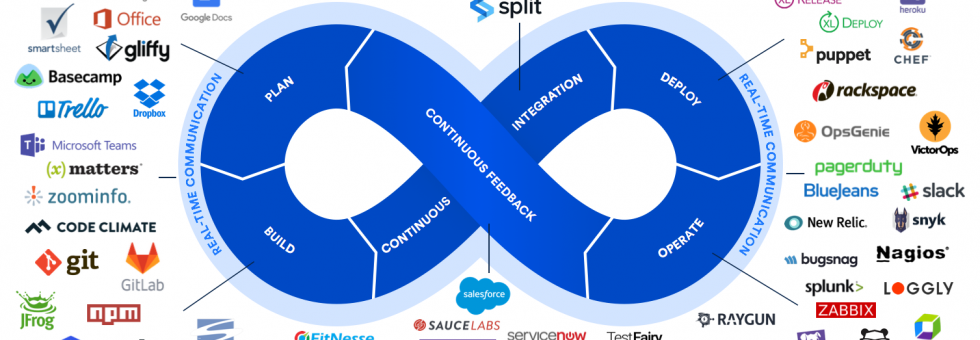
Configuration Management DevOps tools
Puppet: Powering Automated Infrastructure
Puppet is an open-source configuration management tool that automates the management of server configurations. It’s designed to maintain consistency across servers by ensuring they’re configured as required. Puppet integrates easily with Git for version control and uses R10K for automated deployments.
Key Benefits:
- Easily integrates with Git for version control.
- Provides error logs for faster troubleshooting.
However, Puppet can be slow at times, and its configuration system is more suited for baselining rather than orchestration. It may also require custom facts to check system states beyond exec resources.
Ansible: Simplifying Automation
Ansible is known for its simplicity and ease of use. It enables configuration management, orchestration, and automation across various environments. Using YAML-based playbooks, Ansible streamlines complex tasks and is highly effective for cross-platform automation.
Key Benefits:
- Simple YAML syntax for easy automation.
- Cross-platform task management.
Ansible, however, may struggle when scaling for large systems, and lacks support for Windows. It’s also inefficient when synchronizing hundreds of servers at once.
Chef: Ideal for Larger Networks
Chef is a powerful DevOps tool used to manage configurations with its automation framework. It supports complex tasks and integrations, making it ideal for large, cloud-based networks like AWS. Chef also includes InSpec for automated security and compliance testing.
Key Benefits:
- Robust automation and scalability.
- Strong security testing via Chef InSpec.
The learning curve for Chef can be steep, and the lack of detailed documentation makes it difficult for beginners to get started.
CI/CD DevOps tools
Jenkins: The Industry Standard for CI
Jenkins has become a staple for continuous integration due to its powerful ecosystem, plugin support, and community. It integrates seamlessly with version control systems and automates testing, building, and deployment. Jenkins supports Docker integration, making it highly customizable for a variety of projects.
Key Benefits:
- Mature ecosystem and community.
- Easy integration with Docker and version control systems.
Jenkins can be difficult to work with without JenkinsFile, and its Groovy scripting can be inconsistent.
TeamCity: Premium CI for Enterprise Use
TeamCity provides a premium CI solution with powerful configuration features, a user-friendly interface, and high scalability. Ideal for enterprises, it integrates smoothly with GitHub and AWS. Its built-in auto-scaling capabilities make it an excellent choice for teams needing parallel build chains.
Key Benefits:
- Intuitive user interface with template-based build configurations.
- Supports auto-scaling in cloud environments like AWS and Azure.
However, TeamCity can be expensive for smaller teams, and debugging logs can sometimes be difficult to interpret.
Bamboo: Seamlessly Integrating with Atlassian Tools
Bamboo is Atlassian’s CI/CD server, designed to integrate with other Atlassian tools like JIRA and Bitbucket. Its intuitive GUI simplifies automated builds, tests, and releases, creating a cohesive environment for teams already using Atlassian products.
Key Benefits:
- Strong integration with Bitbucket, JIRA, and Confluence.
- Efficient deployment management.
Bamboo’s code analysis capabilities and lack of global configuration can limit its flexibility.
Source Code Management Tools
GitHub: Leading Code Hosting Platform
GitHub is the go-to platform for version control, offering an intuitive UI, powerful integrations, and unmatched reliability. GitHub is perfect for open-source projects and integrates well with Azure DevOps for cloud-based deployments.
Key Benefits:
- Easy integration with Azure DevOps and other CI tools.
- Large developer community and exceptional uptime.
GitHub restricts free private repos to only three collaborators, which could be a limitation for small teams.
GitLab: Comprehensive DevOps Platform
GitLab offers a complete DevOps lifecycle tool, from version control to CI/CD and container management. GitLab allows private instances, making it a flexible option for enterprises. Its open-source nature and comprehensive CI services have made it popular among large organizations.
Key Benefits:
- All-in-one platform for DevOps needs.
- Unlimited private repos and open-source.
However, GitLab can be complex to configure and may require dedicated resources for optimal use.
Deployment DevOps tools
Spinnaker: Kubernetes and Cloud-Native Deployment
Spinnaker is an open-source CD tool for cloud-native applications. It integrates seamlessly with Kubernetes, AWS, and Google Cloud, providing automated deployment pipelines with built-in support for multi-cloud environments.
Key Benefits:
- Multi-cloud deployment capabilities.
- Easy integration with Kubernetes.
Spinnaker’s scalability issues and scarce documentation can make it difficult to use in larger environments.
Octopus Deploy: Simplifying Deployment Pipelines
Octopus Deploy is a versatile tool designed for automating deployments across various environments. It’s widely used for ASP.NET and Java applications and integrates well with CI pipelines like AzureDevOps.
Key Benefits:
- Easy integration with CI systems.
- Automated deployments for various app types.
However, Octopus Deploy can be costly, and its limited ability to export variables between projects can be a challenge.
Security DevOps tools
TwistLock: Container Security for DevOps
Now part of Palo Alto Networks, TwistLock provides comprehensive container security, focusing on securing Kubernetes and Docker environments. With its AI-driven threat detection, TwistLock ensures your containers remain safe in production.
Key Benefits:
- Deep container security with runtime protection.
- Strong compliance with security protocols.
The tool’s cron jobs can be confusing for some users, and its documentation is limited.
Sysdig: Monitoring and Security for Containers
Sysdig offers cloud-native security and monitoring, focusing on containers and microservices. It integrates with orchestration platforms like OpenShift and provides detailed traffic analysis at the kernel level.
Key Benefits:
- Real-time monitoring for cloud infrastructures.
- Deep integration with container platforms like Kubernetes.
Sysdig’s complexity and limited support for non-containerized environments can be drawbacks.
Quality and Testing Tools
JMeter: Load Testing for Web Applications
JMeter is a widely used tool for load and performance testing, especially for web applications. It supports various testing scenarios, including API calls, and provides insightful test results with customizable views.
Key Benefits:
- Supports load, API, and performance testing.
- Cross-platform compatibility.
JMeter can be resource-intensive and may require additional plugins for advanced functionalities.
Selenium: Automated Web Testing
Selenium is a robust tool for automating web application testing. Its extensive support for multiple programming languages and integration with tools like Jenkins makes it a popular choice among developers.
Key Benefits:
- Multi-language support for complex test cases.
- Integration with Jenkins for CI/CD pipelines.
Selenium can be challenging to set up for large-scale projects, and its debugging process can be time-consuming.
Conclusion for Choosing the right DevOps tools
Choosing the right DevOps tools for your organization can drastically improve your software development lifecycle. From configuration management to deployment automation and security monitoring, the tools we discussed are designed to optimize your CI/CD pipelines and ensure your infrastructure remains secure and scalable.
At ZippyOPS, we offer expert consulting, implementation, and managed services for DevOps, DevSecOps, Cloud, AIOps, and Microservices. Our team is here to help you streamline your DevOps processes and integrate the best tools to meet your business needs.
For more information about our services, solutions, or products, visit ZippyOPS Services, ZippyOPS Solutions, and ZippyOPS Products. For a demo, check out our YouTube playlist.
For personalized consultation, reach out to us at sales@zippyops.com.