How to Prevent Clickjacking Attacks: Essential Tips & Best Practices
Clickjacking attacks are a serious cybersecurity threat that can compromise your website’s integrity and expose users to malicious actions. These attacks typically involve deceiving users into clicking on invisible or disguised elements, which can lead to unintended consequences like data theft, malware installation, or unauthorized transactions. In this article, we’ll explore what clickjacking is, its potential risks, and best practices to effectively prevent clickjacking attacks.
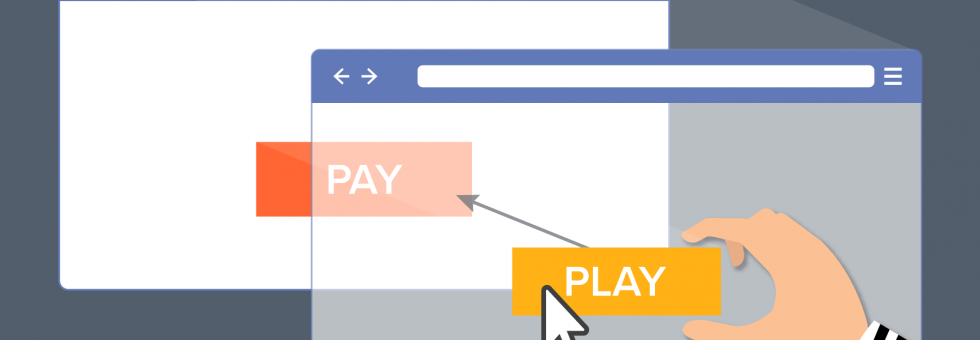
What is a Clickjacking Attack?
A clickjacking attack, also known as UI Redressing, is a type of cyberattack where a user is tricked into clicking an invisible or disguised button or link on a web page. Cybercriminals use layers of transparent or opaque web page elements to mislead users into taking actions they didn’t intend. The typical attack involves placing a hidden iframe on top of a legitimate webpage, causing the user to click on a malicious element without realizing it.
In these attacks, users may unknowingly:
- Visit harmful websites
- Download malicious software
- Transfer funds to fraudulent accounts
- Reveal sensitive personal information, such as login credentials or credit card details
The Risks and Impact of Clickjacking Attacks
Clickjacking can be challenging to detect, as the attack often involves subtle manipulation of the user’s interface. The consequences of a successful attack can be severe, including:
- Microphone or webcam activation
- Theft of login credentials
- Unauthorized fund transfers
- Location tracking
- Malware downloads
While clickjacking vulnerabilities are often considered medium risk—because they require user interaction—the actual impact varies depending on the nature of the targeted application and the type of data at stake. Some victims may face significant financial losses, while others may lose control of their personal data or privacy.
Types of Clickjacking Attacks
Clickjacking attacks can be classified into two primary categories: overlay-based attacks and non-overlay-based attacks. Both types aim to deceive users into clicking hidden or disguised elements.
Overlay-Based Clickjacking Attacks
These attacks are the most common and rely on embedding malicious content in invisible frames or overlays. Common types include:
- Completely Transparent Overlay Attacks: In this attack, the hacker places a malicious iframe over a legitimate page. The iframe is made invisible to the user, so when they click on a legitimate link, they’re actually activating the malicious iframe, which may redirect them to a harmful website or trigger a malicious script.
- Cropping: Here, the attacker only blocks part of the legitimate content, forcing the user to click on a malicious link masked as a legitimate element. For example, the attacker might cover a pop-up window with a fake question, making the user unknowingly click on a harmful link.
- Hidden Overlay: The attacker uses a 1×1 iframe to load malicious content, making it virtually invisible to the user. The iframe is placed directly under the user’s cursor, causing them to unknowingly click on it.
- Pointer Events: This technique involves hiding malicious content behind legitimate elements and ensuring that clicks on the top layer of the page register as clicks on the malicious content. The attacker uses CSS to disable pointer events on the visible elements, allowing clicks to “fall through” to the hidden malicious content.
Non-Overlay-Based Clickjacking Attacks
Even without using overlays, attackers can still carry out clickjacking attacks using the following techniques:
- Scrolling Attacks: In this attack, the hacker manipulates the scroll position of a dialog box or other web elements, so the user only sees part of the content. By hiding important warning messages and showing only action buttons, the attacker tricks the user into taking the wrong action.
- Drag and Drop: Here, the attacker uses a hidden element that appears when the user attempts to drag content on the page. The user may unintentionally drop sensitive data into a malicious location, giving the hacker access to it.
- Rapid Content Replacement: This technique involves rapidly swapping out the content the user sees just before they click. The hacker replaces the visible content with a malicious link at the precise moment the user attempts to interact with the page, leading to unintended consequences.
Examples of Clickjacking Attacks
Clickjacking attacks have evolved into various use-case-specific hacks. Some examples include:
- Likejacking: Popular on social media platforms, this attack tricks users into liking a post or page without their knowledge. The hacker embeds a fake “Like” button inside an iframe, making it invisible to the user, who ends up liking content they didn’t intend to.
- Cursorjacking: In this attack, hackers manipulate the cursor’s position so the user clicks on an unintended element. By hiding the real cursor and displaying a fake one, the attacker can trick the user into clicking on malicious links.
- Cookiejacking: This attack allows hackers to steal a user’s session cookies by using clickjacking techniques. Once the hacker has access to the cookies, they can impersonate the user and steal sensitive data.
- Filejacking: In a filejacking attack, hackers exploit the functionality of modern browsers that allow users to upload files. The attacker can manipulate the file upload process to gain unauthorized access to the user’s file system.
How to Prevent Clickjacking Attacks
Preventing clickjacking attacks involves using a combination of techniques to block malicious iframes and hidden elements from interacting with users. Here are some effective methods to prevent clickjacking:
1. Framebusting (Frame-Breaking)
Framebusting is a client-side technique that prevents a webpage from being loaded within an iframe. Developers can implement a simple script that checks if the page is being loaded in an iframe, and if so, forces it to load in the top window. Here’s an example of a frame-busting script:
if (top.location != location) { top.location = location.href; }
This script ensures that the page is always loaded in the top frame, preventing it from being embedded in an invisible iframe by an attacker.
2. X-Frame-Options Header
The X-Frame-Options HTTP header is an effective way to block clickjacking attacks. By setting this header, you can control whether your website can be embedded in a frame. There are three options:
- DENY: Prevents any website from embedding your content in an iframe.
- SAMEORIGIN: Allows only the current website to embed its content in an iframe.
- ALLOW-FROM: Allows content to be embedded only from a specific URL.
This header is supported by most modern browsers and provides an easy and effective way to prevent clickjacking.
3. Content Security Policy (CSP) Frame-Ancestors Directive
The Content Security Policy (CSP) is a security feature that allows you to specify which sources are allowed to load content on your website. The frame-ancestors directive controls which sites can embed your content in an iframe. You can set it to:
- ‘none’: Prevents any site from embedding your content.
- ‘self’: Only allows the current website to embed its content.
- Specify trusted sites: Allows only specific sites to embed content.
For example, you can set the CSP header like this:
Content-Security-Policy: frame-ancestors 'self' *.trusted.com;
By implementing these strategies, you can significantly reduce the risk of clickjacking attacks on your website.
Conclusion: Protecting Your Website from Clickjacking
Clickjacking attacks pose a significant threat to the security and privacy of your users. By understanding the different types of clickjacking techniques and implementing preventive measures such as framebusting, X-Frame-Options, and Content Security Policy, you can protect your website from these malicious attacks.
At the same time, it’s essential to stay vigilant and regularly review your website’s security protocols. ZippyOPS offers expert consulting, implementation, and managed services to help businesses secure their web applications and infrastructure. Whether you need guidance on DevSecOps, Cloud Security, or Infrastructure Protection, ZippyOPS provides tailored solutions to safeguard your digital assets.
For more information on our services, check out our services, solutions, and products pages. You can also explore helpful demo videos on our YouTube channel.
Need assistance with securing your web applications? Contact us today at sales@zippyops.com.