Authentication Apps MFA: The Most Secure Multi-Factor Option
When teams plan multi-factor authentication, several options appear right away. For example, social media login, email codes, SMS messages, authentication apps, and biometrics are all common choices. However, authentication apps MFA usually delivers the strongest balance of security and control.
Today, cyberattacks and data theft keep rising. Because of this, organizations need MFA that protects users without adding too much friction. Although every method has pros and cons, some approaches clearly reduce risk better than others.
Understanding Multi-Factor Authentication Basics
Multi-factor authentication works by combining different proof types. In simple terms, it checks:
- Something you know, such as a password or PIN
- Something you have, like a phone or security key
- Something you are, for instance a fingerprint or face scan
Authentication apps MFA uses all three at the same time. As a result, attackers must break several layers, which is far harder to do.
Social Media Login as MFA
Social media login is often used because it feels easy. Users can sign in with an existing account instead of creating a new password. Therefore, onboarding becomes faster.
At the same time, this method creates shared risk. If a social media account gets compromised, every connected service becomes exposed. Moreover, users cannot always control password strength or MFA settings on those platforms. Privacy concerns also appear, since data sharing may happen across sites.
Email Codes and MFA Security
Email-based MFA sends a one-time code to the user’s inbox. This approach is simple and cheap to deploy. Because of this, many applications still rely on it.
However, email accounts are frequent attack targets. Phishing and password reuse make them easy to compromise. Consequently, email codes add only limited protection, especially when compared to authentication apps MFA.
SMS-Based MFA: Pros and Cons
SMS confirmation improves slightly on email codes. Users receive a text message directly on their phone, which often has basic device security. As a result, many banks and healthcare apps still use SMS MFA.
Nevertheless, SIM swapping attacks remain a serious threat. In such cases, attackers hijack phone numbers and receive MFA codes themselves. Therefore, SMS should be treated as a backup option rather than the primary defense.
Why Authentication Apps MFA Leads in Security
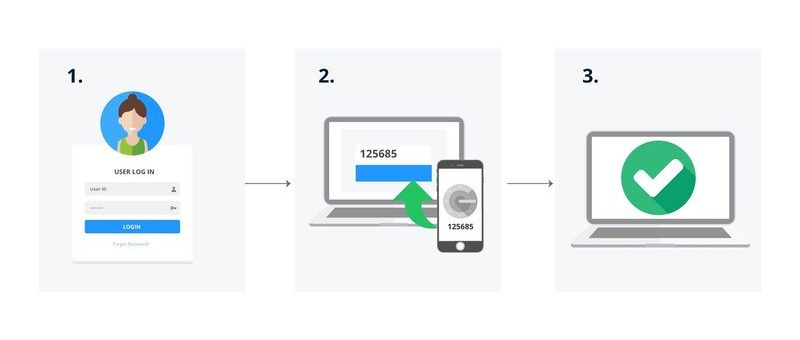
Authentication apps MFA stands out because it avoids many common attack paths. Instead of sending codes over email or SMS, the app generates them locally on the device. Because of this, phishing and SIM spoofing become far less effective.
Popular tools like Microsoft Authenticator, Google Authenticator, and similar apps add extra safeguards. For example, they often require biometrics or a device PIN. Some also show login locations, which helps users block suspicious attempts instantly.
According to the NIST Digital Identity Guidelines (SP 800-63B), app-based authenticators provide stronger assurance than SMS or email methods, especially for sensitive systems. This guidance reinforces why security teams increasingly choose authentication apps MFA for modern platforms.
The only real downside is user effort. Logging in takes a few extra seconds. However, the added protection usually outweighs this small inconvenience.
Biometric MFA in Practice
Biometric MFA relies on fingerprints, face scans, or similar traits. This method is fast and user-friendly. Moreover, it resists many remote attacks.
Still, biometric data must be stored and protected carefully. If leaked, it cannot be changed like a password. Because of this, biometrics work best when combined with authentication apps MFA rather than used alone.
Choosing the Best MFA Strategy
In summary, authentication apps MFA provides the highest security level for most use cases. Biometrics and SMS can support it as secondary options. Email codes and social sign-on, however, offer much weaker protection.
Not every system supports app-based MFA yet. Where limitations exist, SMS or biometrics can fill the gap. Even so, long-term roadmaps should prioritize authentication apps MFA wherever possible.
Secure MFA at Scale with ZippyOPS
Implementing strong MFA is not only a security task. It also touches infrastructure, cloud platforms, and daily operations. ZippyOPS helps organizations design and deploy secure authentication as part of a broader DevOps and DevSecOps strategy.
Through consulting, implementation, and managed services, ZippyOPS supports Cloud, DataOps, Automated Ops, AIOps, MLOps, Microservices, Infrastructure, and Security initiatives. As a result, MFA becomes integrated into CI/CD pipelines and production systems instead of standing alone.
You can explore ZippyOPS services at https://zippyops.com/services/ or review real-world solutions at https://zippyops.com/solutions/. In addition, ZippyOPS products help teams standardize secure access across environments: https://zippyops.com/products/.
For practical demos and walkthroughs, the ZippyOPS YouTube channel shares clear, hands-on videos: https://www.youtube.com/@zippyops8329.
Final Takeaway for Authentication apps MFA
Authentication apps MFA remains the most secure and future-ready MFA option. It reduces common attack risks while supporting modern cloud and microservices environments. When implemented correctly, it strengthens both user trust and operational security.
To discuss secure MFA implementation or broader cloud and security needs, contact sales@zippyops.com for a professional consultation.